
AI integration for existing software should not start with the question, "How do we add AI?"
It should start with a better question: "Where can AI reduce manual work, improve decision-making, help users move faster, or make existing data more useful?"
That distinction matters.
Many companies are under pressure to add AI features to their SaaS products, internal platforms, CRMs, mobile apps, customer portals, and operational systems. But adding a generic chatbot or AI button rarely creates lasting value on its own.
AI becomes useful when it is connected to the actual product: its users, workflows, permissions, data, documents, communication patterns, and business logic.
This guide explains where AI integration for existing software creates real value, what to avoid, and how to approach AI features in a way that supports the product instead of distracting from it.
What does AI integration for existing software mean?
AI integration for existing software means adding AI-powered capabilities into a product that already exists.
This may be a SaaS platform, CRM system, operational dashboard, internal business tool, mobile app, customer portal, document workflow, reporting platform, or data-heavy product.
The AI feature may help users:
- generate content
- summarize information
- search across stored data
- ask questions about business records
- extract structured information from emails or PDFs
- draft replies or recommendations
- classify incoming requests
- automate repetitive workflows
- turn unstructured text into actionable system data
The important point is that the AI is not separate from the product.
It works inside the existing system and respects the system's rules, user roles, data structure, and business logic.
AI should solve a real product problem
The strongest AI features usually come from existing friction.
Look for parts of the product where users repeat the same manual work, search through too much information, write similar content repeatedly, read long documents, process messy inputs, or make decisions based on scattered data.
These are better starting points than adding AI because competitors are doing it.
Useful AI integration usually answers one of these questions:
- Can this help users complete a task faster?
- Can this reduce repetitive manual work?
- Can this make existing data easier to understand?
- Can this turn unstructured input into structured product data?
- Can this help users write, summarize, classify, or decide with better context?
- Can this improve the product without creating new operational risk?
If the answer is unclear, the feature may not be ready.
Where AI integration for existing software creates value
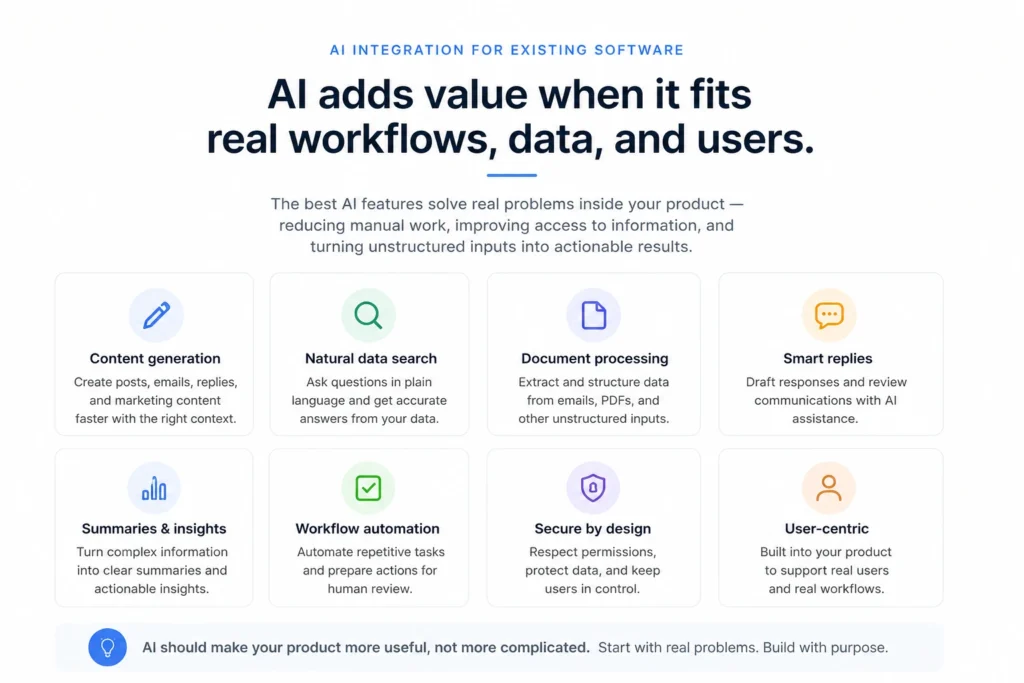
AI integration for existing software creates the most value when it is tied to specific workflows.
Below are the areas where AI is often useful in existing products.
1. Content generation inside existing workflows
Content generation is one of the most practical AI use cases when the product already involves communication, marketing, support, reviews, or customer engagement.
For example, an existing CRM or business platform may help users generate:
- social media post drafts
- email content
- customer replies
- campaign copy
- review responses
- short descriptions
- summaries of customer activity
The value is not simply that AI can write text.
The value comes from context.
If the AI feature understands the business, customer record, campaign, tone, previous activity, and user intent, the output becomes much more useful than a blank external AI prompt.
This is one of the ways AI can support existing software without changing the entire product.
2. AI-assisted replies and customer communication
Many business systems involve repeated communication.
Users may need to respond to reviews, customer messages, support tickets, sales inquiries, or internal requests. AI can help draft responses faster, especially when the system already contains useful context.
For example, AI can help with Google Business Profile review responses by drafting professional replies based on review tone, customer context, and business guidelines.
This is useful because the user remains in control.
The AI drafts the response. The human reviews, edits, and sends it.
That is often the right model for customer-facing AI: assist the user, but do not blindly automate communication where tone, accuracy, and reputation matter.
3. Natural-language search over product data
Many software products store valuable data that users struggle to search properly.
Dashboards, filters, and reports are useful, but they require users to know exactly where to look and how the data is structured.
AI can make this easier by allowing users to ask questions in natural language.
For example:
- "Which customers had the most activity this month?"
- "Show me unresolved issues from last week."
- "Which locations had delayed orders?"
- "Summarize performance across these assets."
- "Which events look unusual compared to normal activity?"
This can be especially valuable in operational platforms, CRMs, analytics products, and data-heavy business systems.
The key is that the AI must retrieve and reason over the right data. It should not guess.
4. Asking questions over operational data
Operational platforms often contain data from multiple sources: IoT devices, external systems, user inputs, documents, APIs, and internal workflows.
AI can help users interact with that data more naturally.
Instead of manually navigating dashboards or exporting reports, users can ask questions over operational data and receive structured answers, summaries, or suggested next steps.
This does not replace the underlying platform.
It makes the platform easier to use.
The existing software still needs correct permissions, reliable data models, auditability, and clear workflows. AI becomes an interaction layer that helps users access and understand the data faster.
5. Turning emails and PDFs into actionable system data
Some of the strongest AI use cases involve unstructured input.
Many businesses still receive important information through emails, PDF documents, attachments, scanned forms, order requests, or free-text messages.
Traditionally, someone has to read those documents and manually enter the information into a system.
AI can help extract structured information from these inputs and translate them into actionable in-system records.
For example, an AI feature may read an email or PDF order, identify the relevant order details, map them to the correct fields, flag missing information, and prepare a draft order inside the system.
This can reduce manual entry, speed up operations, and improve consistency.
But the system still needs validation.
The safest approach is usually to let AI prepare the structured data, then allow a user or rule-based process to confirm it before it becomes final.
6. Summaries and decision support
AI is useful when users need to understand a lot of information quickly.
This may include:
- summarizing customer history
- summarizing operational activity
- summarizing support conversations
- summarizing long documents
- summarizing changes across a product or account
- highlighting anomalies, risks, or missing information
Summaries are valuable because they reduce the time needed to understand context.
But summaries should be treated carefully. For important workflows, users should be able to inspect the source data behind the summary.
7. Workflow automation with human review
AI can support workflow automation, but full automation is not always the right first step.
In many business systems, AI should help prepare work rather than silently complete it.
Examples include:
- drafting a response
- preparing a task
- classifying a request
- suggesting the next action
- extracting order data
- flagging missing information
- routing an issue to the right team
Then a user confirms, edits, or rejects the suggestion.
This keeps the feature useful while reducing risk.
Real example: AI features in AnthemCRM
A practical example of AI integration for existing software is AnthemCRM, a custom CRM and SaaS platform developed by mile.dev.
In AnthemCRM, AI is not treated as a separate gimmick.
It supports real CRM and marketing workflows.
Examples include AI-assisted content generation for social media posts and help with Google Business Profile review responses.
These features make sense because they sit inside an existing business context. Users are already managing customer relationships, communication, marketing activity, and business presence. AI helps reduce the manual effort needed to create or respond to content while keeping the user in control.
This is the right kind of AI integration: connected to real product behavior, useful inside existing workflows, and designed to support users rather than replace their judgment.
Real example: AI interaction with operational data in Aiota
Another example is Aiota, an operational data platform designed to unify IoT, business systems, external data sources, and real-world workflows.
In a platform like Aiota, AI can create value by allowing users to ask questions over operational data.
That matters because operational data can be complex. It may come from different sources, represent different customer workflows, and change as the platform expands.
Instead of forcing users to manually inspect every dashboard or report, AI-assisted interaction can help them find answers faster.
AI can also help translate email or PDF orders into actionable in-system orders. This is valuable because many operational workflows still begin with unstructured documents or messages. AI can extract the important details, map them to the system, and prepare structured records for review and processing.
This type of AI feature is not just a chatbot.
It is a product capability connected to data, workflows, and business operations.
What AI should not do in existing software
AI can be useful, but it can also create noise if applied poorly.
Here are common mistakes to avoid.
1. Adding a generic chatbot with no product context
A chatbot that does not understand the product, user permissions, data structure, or workflow usually creates limited value.
Users can already use external AI tools for generic questions.
Inside a software product, AI should be more useful than a blank prompt. It should understand what the user is trying to do and what the system can safely access.
2. Letting AI guess when it should retrieve data
AI should not invent answers about business data.
If a user asks about orders, customers, revenue, events, assets, or operational activity, the system should retrieve the correct data first and then use AI to interpret, summarize, or explain it.
This is one of the most important architecture decisions in AI software integration.
The model should be connected to the system in a controlled way, not asked to guess from memory.
3. Ignoring permissions and access control
AI features must respect the same permission rules as the rest of the product.
If a user is not allowed to see certain records, the AI should not reveal them through a summary, answer, or generated response.
This is especially important in SaaS platforms with multiple organizations, roles, teams, or customer accounts.
AI integration must be designed around security boundaries from the beginning.
4. Automating too much too early
It is tempting to automate entire workflows immediately.
But in real business systems, the safer first version is often assistive.
AI can draft, classify, summarize, extract, suggest, and prepare. Then a human confirms the result.
Once the system has proven accuracy and the workflow is well understood, more automation can be added carefully.
5. Treating AI output as always correct
AI output should be reviewed according to the risk of the workflow.
A social media draft has lower risk than a financial decision, legal instruction, medical recommendation, or customer-impacting operational action.
The product should make that difference clear.
High-risk workflows need stronger validation, audit trails, source references, or human approval.
Architecture matters in AI integration
Good AI integration is not only prompt writing.
It is a software architecture problem.
The team needs to decide:
- which data the AI can access
- how that data is retrieved
- how permissions are enforced
- where prompts are managed
- how outputs are validated
- where user feedback is stored
- how costs are controlled
- how latency affects the user experience
- how AI activity is logged
- what happens when the AI fails or returns low-confidence output
This is why AI features should be planned as part of the product system, not added as an isolated plugin.
OpenAI provides API capabilities for building AI-powered applications and agents, but the value of the final feature still depends heavily on how the product connects AI to data, workflow, UX, and business rules. You can explore OpenAI's API platform here: OpenAI API.
Security and risk should be part of the plan
AI features introduce new risks.
These may include prompt injection, sensitive data exposure, insecure output handling, overreliance on AI output, excessive automation, and unclear user expectations.
The OWASP Top 10 for LLM Applications is a useful reference for teams building AI features into real products. It covers common security risks specific to LLM and generative AI applications. You can review it here: OWASP Top 10 for LLM Applications.
For broader AI governance and risk thinking, the NIST AI Risk Management Framework is also useful. It gives organizations a structured way to think about trustworthiness, risk, and responsible AI system design. You can read more here: NIST AI Risk Management Framework.
Not every product needs a formal enterprise AI governance program.
But every serious AI integration should consider risk, permissions, validation, and user trust.
How to decide where to add AI first
The best first AI feature is usually not the most impressive demo.
It is the feature that solves a clear user problem with manageable technical risk.
When deciding where to start, look for workflows with:
- high manual effort
- repetitive content creation
- large amounts of text or data
- unstructured emails or documents
- clear rules for validation
- low-to-medium risk if the AI needs correction
- measurable time savings
- strong connection to existing product data
Good first AI features often include content drafts, summaries, document extraction, internal search, assisted replies, classification, and operational Q&A.
Weak first AI features are usually broad, vague, and disconnected from existing workflows.
AI integration roadmap for an existing product
A practical AI integration roadmap can be structured in phases.
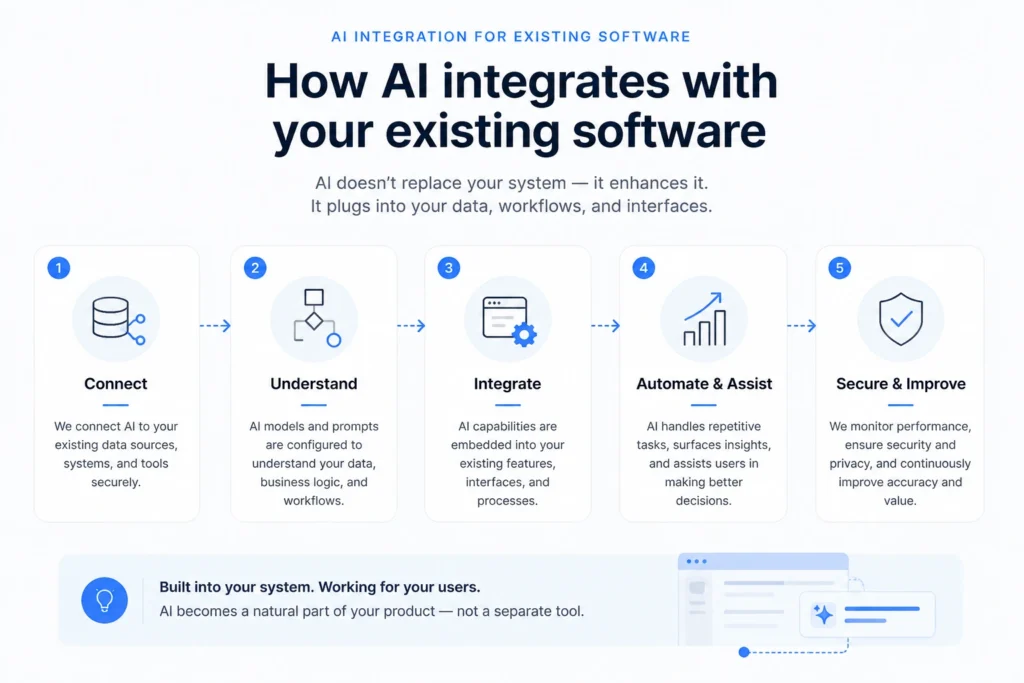
Step 1: Identify useful workflows
Start by mapping where users spend time manually.
Look at repeated writing, searching, summarizing, classifying, reviewing, copying data, or interpreting documents.
Step 2: Check the data foundation
AI is only as useful as the data and context it can access.
Before building, review data structure, permissions, quality, completeness, and how the system currently stores the information AI will need.
If the data is messy, the first step may be product and data cleanup.
This is similar to broader modernization work. We covered that in more detail in our guide on modernizing legacy software.
Step 3: Design the user experience
AI features need clear UX.
Users should understand what AI is doing, what data it used, whether the output needs review, and how they can edit or reject the result.
A strong AI feature should feel like a natural part of the product, not a separate experiment bolted onto the interface.
Step 4: Build a controlled first version
The first version should usually be limited and measurable.
For example:
- generate social media post drafts for a specific workflow
- draft Google review responses with user approval
- summarize a customer record
- extract order details from a PDF
- answer questions over a specific data set
This keeps the scope manageable and allows the team to learn from real usage.
Step 5: Add validation and feedback
AI features improve when the product captures useful feedback.
Users should be able to edit, approve, reject, regenerate, or flag outputs. The system should track where the AI performs well and where it needs better context or constraints.
Step 6: Expand only where value is proven
Once one AI workflow proves useful, expand carefully.
Do not turn every part of the product into an AI feature.
Expand where the value is clear and the risk is understood.
AI integration and custom software decisions
AI integration can also affect whether a business needs custom software or off-the-shelf tools.
Some AI use cases can be handled by existing tools.
But if the AI feature needs to connect deeply to proprietary data, customer-specific workflows, custom permissions, existing systems, internal processes, or domain-specific logic, custom development may be the better path.
We covered this broader decision in our article on custom software vs off-the-shelf software.
AI does not remove the need for product architecture.
In many cases, it makes architecture more important.
What kind of team do AI integrations need?
AI integration for existing software usually requires more than one skill set.
A strong team may need:
- product thinking to identify useful workflows
- backend engineering to connect AI to product data
- frontend or mobile development to create the user experience
- data modeling to structure information properly
- security thinking to protect permissions and sensitive data
- QA/testing to validate outputs and edge cases
- DevOps/infrastructure support to monitor cost, latency, and reliability
This is why AI integration should be treated as product development, not only model experimentation.
We covered role structure in more detail in our guide on software development team structure.
How mile.dev approaches AI integration for existing software
At mile.dev, we approach AI integration for existing software by starting with the existing product and business workflow.
We do not recommend adding AI just because it looks good in a demo.
We look at where AI can reduce manual effort, improve access to data, support users inside real workflows, or turn unstructured inputs into structured system actions.
Our work includes custom software development, SaaS platforms, backend systems, data platforms, AI integrations, automation, cloud infrastructure, and modernization of existing systems.
For existing products, the first step is usually technical and product assessment:
- What does the current system already do?
- Where are users losing time?
- Which data sources are reliable?
- Which workflows could AI support?
- What permissions and risks must be respected?
- What would a useful first AI feature look like?
The goal is not to make the product look more "AI-powered."
The goal is to make the product more useful.
So, where does AI actually create value?
AI creates value when it is connected to the real work users already do.
It can help generate content, draft replies, summarize activity, search data, process documents, answer questions over operational systems, classify inputs, and prepare actions for review.
It creates less value when it is generic, disconnected, over-automated, or added without a clear user problem.
The strongest AI integrations are practical, focused, and deeply connected to the existing product.
If you have an existing SaaS platform, CRM, operational system, internal tool, or business product and want to explore where AI could create real value, you can start with a free consultation. Send us the product context, current workflows, and what you want AI to help with, and we will review the technical direction before suggesting the next step.