
Modernizing legacy software is not always about rewriting everything from scratch. The same applies when the system is a vibe-coded app that has outgrown its prototype.
In many cases, the better first step is to understand what already exists: how the system is structured, where it is unstable, which parts still work, which parts slow the business down, and what risk the current software creates.
Only after that assessment does the right path become clear.
Sometimes the answer is refactoring. Sometimes it is infrastructure modernization. Sometimes it is rebuilding one part of the system. Sometimes the safest option is replacing the system gradually while the existing product keeps running.
The worst decision is usually the automatic one: deciding to rebuild everything before understanding the real problem.
This guide explains how to think about modernizing legacy software, when refactoring makes sense, when rebuilding is justified, and how to reduce risk when an existing system still supports real users or business operations.
What does modernizing legacy software mean?
Modernizing legacy software means improving an existing system so it becomes more stable, maintainable, scalable, secure, and useful for the business.
Legacy software does not always mean ancient software.
A system can become “legacy” when it is difficult to change, difficult to deploy, difficult to understand, or risky to maintain. It may use an outdated framework, an old infrastructure setup, poor database structure, fragile integrations, or code that only a few people understand.
In some cases, the system still works for users but creates serious problems for the company behind it.
Modernization is about reducing that risk while creating a better foundation for future development.
Common signs that software needs modernization
Most legacy systems do not become problematic overnight.
The issues usually build up gradually.
At first, small workarounds seem manageable. Then releases become slower. Bugs become harder to fix. Developers become afraid to change certain parts of the system. Infrastructure becomes harder to update. New features take longer than they should.
Eventually, the software starts limiting the business.
1. Releases are slow or risky
If every release feels dangerous, the system may need modernization.
Common signs include:
- too many manual deployment steps
- unclear release process
- frequent production bugs after updates
- limited staging or testing environments
- developers avoiding certain changes because they may break unrelated features
A system that cannot be released safely becomes expensive to improve.
Even small changes can require excessive testing, coordination, and recovery planning.
2. The codebase is hard to understand
Legacy code is not only old code. It is often code that has lost its structure over time.
This can happen when features are added quickly without clear architecture, when multiple teams work without shared standards, or when the original developers are no longer involved.
Symptoms include:
- unclear business logic
- duplicated code
- large files with too many responsibilities
- poor separation between frontend, backend, and data logic
- features that depend on hidden side effects
- limited documentation
When developers need too much time to understand the system, every new feature becomes slower and more expensive.
3. The database structure no longer supports the product
Database problems are often one of the most serious signs of legacy software.
If the data model is poorly structured, the product becomes harder to extend. Queries become slower. Reporting becomes unreliable. Data migrations become risky. New features require workarounds instead of clean development.
Examples include:
- important relationships stored in text fields or JSON blobs without proper structure
- missing relationships between entities
- duplicated data
- unclear ownership of records
- tables that became overloaded with unrelated responsibilities
- slow or fragile queries
Modernizing legacy software often requires careful database improvement, not only code changes.
4. Infrastructure is outdated or difficult to maintain
Many legacy systems run on infrastructure that worked at the time but no longer supports the product well.
This may include outdated servers, old PHP or framework versions, limited monitoring, manual backups, no deployment automation, poor storage structure, or hosting environments that are difficult to update.
Infrastructure modernization can include:
- moving from an old server to cloud infrastructure
- updating runtime versions and dependencies
- separating storage, database, and application services
- setting up proper staging environments
- improving deployment workflows
- adding monitoring, backups, and error tracking
This kind of work may not be visible to users immediately, but it can be critical for stability and future development.
5. The system cannot support new business needs
Legacy software becomes a business problem when it blocks growth.
That can happen when the company needs new features, new integrations, mobile apps, AI features, reporting, automation, customer portals, or better operational workflows — but the current system makes every change difficult.
At that point, modernization is not just a technical cleanup project.
It becomes part of the company’s ability to move forward.
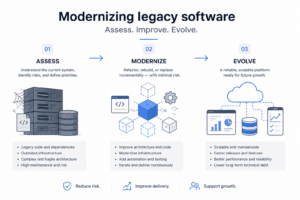
Modernizing legacy software: the first step is assessment
Modernizing legacy software should start with assessment, not assumptions.
Before choosing between refactoring, rebuilding, replacing, or migrating, the team needs to understand what is actually wrong with the system.
A good assessment should look at:
- current architecture
- code quality
- database structure
- infrastructure
- deployment process
- testing process
- security risks
- business-critical workflows
- integration points
- known bugs and operational pain points
- future product requirements
The goal is not to criticize old decisions. Many legacy systems were built under pressure, with incomplete information, limited budgets, or changing requirements.
The goal is to understand the safest path forward.
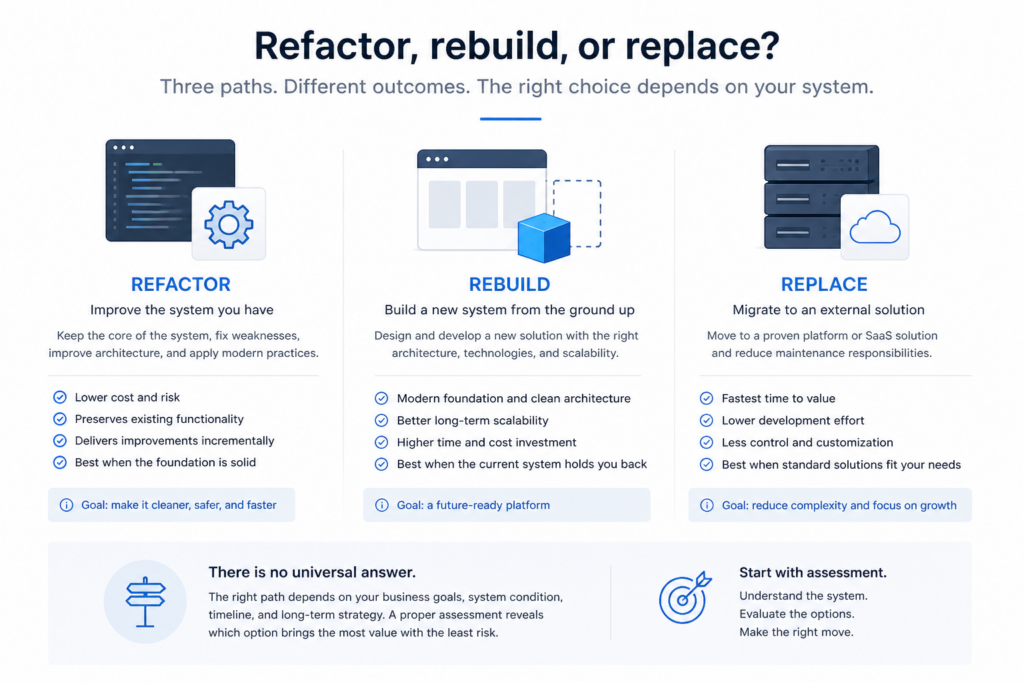
Refactor, rebuild, or replace: what is the difference?
These terms are often used loosely, but they describe different approaches.
Refactoring
Refactoring means improving the internal structure of the existing system without changing what users experience directly.
This can include cleaning up code, improving architecture, separating responsibilities, restructuring data access, updating dependencies, or making specific parts of the system easier to change.
Refactoring is usually best when the system still works, the business logic is valuable, and the main problem is maintainability.
Rebuilding
Rebuilding means creating a new version of the system or a major part of it.
This may be necessary when the existing foundation is too difficult to repair, the architecture is blocking progress, or the product needs a fundamentally different structure.
Rebuilding can be useful, but it also carries risk. A full rewrite can take longer than expected, miss hidden business logic, and delay new features while the old and new systems compete for attention.
Replacing
Replacing means moving from the old system to a different product or platform.
Sometimes this means buying off-the-shelf software. Sometimes it means replacing one custom system with another. Sometimes it means replacing only one part of a larger system.
Replacement makes sense when the current system solves a problem that is no longer unique, or when maintaining the old system creates more cost than value.
We covered this decision from a broader business perspective in our guide on custom software vs off-the-shelf software.
When refactoring legacy software makes sense
Refactoring is often the right choice when the system is still valuable but difficult to maintain.
This is common in products that already have users, data, revenue, or operational importance. The business cannot simply stop everything and rebuild from zero.
Refactoring works best when:
- the product still serves users
- the core business logic is still valid
- the main problems are maintainability and stability
- the team can improve the system incrementally
- there is enough test coverage or manual QA process to reduce risk
- the architecture can be improved section by section
Good refactoring is usually targeted.
The goal is not to make every part of the codebase perfect. The goal is to improve the parts of the system that create the most risk, slow down the most development, or block the next stage of product growth.
Legacy software rebuild: when it makes sense
Rebuilding can be the right decision, but it should be justified by evidence.
A rebuild may make sense when:
- the existing architecture cannot support required features
- the system is unstable beyond practical repair
- the technology stack is no longer maintainable
- security or compliance risks are too high
- the user experience needs to change fundamentally
- the system depends on outdated services that cannot be upgraded safely
- the cost of maintaining the old system is higher than rebuilding over time
However, rebuilding everything at once can create major risk.
Legacy systems often contain hidden business rules that are not written down anywhere. Those rules may exist only inside old code, database behavior, admin workflows, or team habits.
If a team rewrites too quickly without understanding those details, the new system may look cleaner but fail to support real operations.
When replacing legacy software makes sense
Replacement makes sense when the business no longer needs custom logic in that part of the system.
For example, if an old internal tool handles a standard process that a mature SaaS product now solves well, replacing it may be smarter than modernizing it.
Replacement may also make sense when a legacy system is too expensive to maintain and does not create competitive advantage.
But replacement should still be assessed carefully.
The key questions are:
- What workflows does the current system support?
- Which workflows are standard?
- Which workflows are specific to the business?
- What data needs to be migrated?
- What integrations need to continue working?
- What will users lose or gain after replacement?
Replacing software is not only a technical decision. It affects teams, data, customers, and operations.
Incremental modernization is often safer than a big rewrite
For many legacy systems, the safest path is incremental modernization.
Instead of pausing everything and rebuilding the whole product, the team improves the system section by section.
This can include:
- stabilizing infrastructure first
- updating outdated dependencies
- introducing better deployment workflows
- refactoring one module at a time
- restructuring database relationships gradually
- moving selected features into new services
- adding tests around business-critical workflows
- replacing only the parts that create the most risk
This approach is often aligned with the Strangler Fig pattern, where parts of an old system are gradually replaced while the existing application continues to function. Martin Fowler describes the pattern as a way to gradually replace legacy systems, and Microsoft’s Azure Architecture Center describes it as a controlled and phased modernization approach.
You can read more about the pattern here:
The point is not that every project must use this exact pattern.
The point is that modernization often works best when it reduces risk while keeping the business running.
Legacy software modernization is not only about code
Many modernization projects fail because they focus only on code cleanup.
Code matters, but legacy software problems often include infrastructure, data, deployments, testing, documentation, product decisions, and team workflow.
Infrastructure modernization
Modernizing infrastructure can improve reliability, deployment speed, monitoring, backups, scalability, and future maintenance.
This may involve moving from outdated hosting to AWS, Azure, or another cloud setup. It may also include splitting services, improving storage, adding monitoring, or creating separate staging and production environments.
AWS describes migration and modernization as a way to reduce technical debt and improve how workloads are operated in the cloud. Their migration and modernization resources are available here: AWS Migration and Modernization.
Database modernization
Database modernization may include restructuring relationships, removing duplicated data, improving indexing, separating concerns, migrating old data formats, and making the data model easier to query and maintain.
This work is often delicate because data is tied directly to business operations.
A poorly planned database migration can create more risk than the old system itself.
Release process modernization
A modernized system should be easier to release.
This may include better staging environments, beta testing, automated deployment steps, clearer release ownership, rollback planning, and improved QA workflows.
For live products, release stability is often one of the biggest practical wins of modernization.
Product workflow modernization
Sometimes the software is not the only problem. The product workflow itself may need to be clarified.
If teams have been using workarounds for years, the modernization process can reveal better ways to support the business process.
This is where technical and product thinking need to work together.
Real example: modernizing gowithYamo
A strong example of modernizing legacy software is gowithYamo, a UK-based mobile art discovery platform.
When mile.dev took over development, gowithYamo was already live. The product had real users, mobile apps, backend services, data, infrastructure, and ongoing feature needs.
The challenge was not simply to build a new product from scratch.
The challenge was to stabilize and improve an existing live platform without stopping product development.
The work included:
- continuous development of native iOS and Android applications
- refactoring backend services and data structures
- modernizing an outdated PHP / Laravel backend
- migrating infrastructure from DigitalOcean to AWS
- improving database relationships and legacy data structures
- setting up better staging, beta distribution, and release workflows
- supporting ongoing feature development while improving stability
This is exactly why legacy software modernization requires assessment first.
Some parts of the system needed refactoring. Some parts needed infrastructure migration. Some parts needed better release process. Some parts needed ongoing feature development while the foundation was being improved.
A full stop-and-rebuild approach would have created unnecessary product risk.
Instead, the platform could be improved incrementally while continuing to operate.
The result is a platform that now supports over 53,000 users, 36,000 events, 3,800 galleries, and 18,000 check-ins — while continuing to receive regular feature releases across native iOS and Android applications.
Modernization made the product more stable, more maintainable, and more capable of growing without the constraints of the original system.
Modernization risks to avoid
Modernization can create value, but it can also create risk if handled poorly.
Risk 1: rewriting without understanding the old system
Old systems often contain important business logic.
Some of it may be messy. Some of it may be undocumented. But it may still be essential.
If the team rewrites without understanding that logic, the new system may fail in ways the old system already handled.
Risk 2: modernizing everything at once
Trying to modernize every part of a system at once can create too much complexity.
It becomes difficult to separate technical cleanup from product changes, infrastructure updates, database migrations, and new feature development.
A phased approach is usually safer.
Risk 3: ignoring users during modernization
Modernization should not only satisfy developers.
If the product is live, users still need stability. Internal teams still need workflows. Customers still need service continuity.
Technical improvement should support product reliability, not disrupt it unnecessarily.
Risk 4: treating modernization as a one-time cleanup
Modernization is not always a single project.
For long-term products, modernization may become part of continuous development: improving architecture, reducing technical debt, updating dependencies, improving infrastructure, and keeping the system healthy as the product grows.
How to plan a legacy software modernization project
A good modernization plan should be structured around risk, business value, and technical dependencies.
Step 1: Map the current system
Before changing the system, understand it.
This includes architecture, infrastructure, database structure, integrations, deployments, dependencies, user roles, and core workflows.
Step 2: Identify the highest-risk areas
Not all technical debt matters equally.
Some messy code may not create immediate business risk. Other areas may block releases, create bugs, slow development, or expose the business to security or operational problems.
Prioritize the parts that matter most.
Step 3: Separate stabilization from feature development
Modernization often happens while the product still needs new features.
The team should separate foundational work from product work clearly, so the client understands where effort is going and why it matters.
Step 4: Choose the modernization path
After assessment, choose the right path for each part of the system:
- refactor what is valuable but poorly structured
- rebuild what cannot support future requirements
- replace what no longer needs to be custom
- migrate infrastructure where stability or scalability requires it
- leave low-risk areas alone until they become relevant
Step 5: Modernize incrementally where possible
For live systems, incremental modernization is often safer than big-bang replacement.
It allows the product to continue operating while the technical foundation improves step by step.
How much does legacy software modernization cost?
The cost of modernizing legacy software depends on the size of the system, the state of the codebase, the infrastructure, the database structure, the number of integrations, and the amount of business risk involved.
A small refactoring project may be limited in scope. A larger modernization project may involve architecture, backend work, frontend updates, database migration, cloud infrastructure, testing, release workflows, and ongoing development.
The biggest cost driver is usually uncertainty.
If the existing system is poorly documented, unstable, or difficult to inspect, the first phase should focus on discovery and technical assessment.
AI-assisted development has changed this calculus significantly. Work that previously required months — a full codebase analysis, documentation of undiscovered business logic, a phased rewrite — can now be completed in weeks. For clients on ongoing development partnerships, this means the same budget delivers substantially more.
This is similar to how MVP cost depends heavily on scope and technical complexity. We covered that in more detail in our guide on how much it costs to build an MVP.
How AI tools are changing legacy software modernization
One of the practical shifts in modernizing legacy software is how AI-assisted development has changed the speed and cost of analysis and rewriting.
Traditionally, understanding a legacy codebase takes significant time. Developers need to read through old code, trace undocumented logic, reconstruct how the system actually behaves, and document it before they can safely change anything.
AI tools can now assist with that analysis directly. A developer can point AI tools at a specific module, ask it to analyze the structure and document what it finds, then plan and execute a rewrite — section by section — while tests are written and run as part of the same workflow.
In practice, this has changed the economics of legacy modernization. Applications that originally required months to build — and accumulated years of technical debt — can now be rewritten to modern standards in weeks.
For legacy systems where a full rebuild is the right call, AI-assisted development significantly reduces the cost and timeline. Clients get a modern, maintainable system faster, and the same budget stretches further than it would under a traditional development approach.
What legacy modernization services include
If you bring in an outside team, legacy modernization services usually cover more than code changes. A complete engagement typically includes:
- an assessment of the current system: architecture, code quality, security, infrastructure, and business risk
- a modernization plan that chooses between refactoring, rebuilding, or replacing each part of the system
- stabilization work first, so the system is safe to change
- incremental delivery, with the old and new parts running side by side where needed
- data and infrastructure migration, with verification at every step
- documentation and knowledge transfer, so the knowledge no longer lives in one person
- ongoing maintenance after the modernization, so the system does not become legacy again
When you compare providers, ask to see a system they have modernized and still maintain, ask who owns the architecture decisions, and ask how they will keep the business running during the work. Our software development services page explains how we run these engagements.
How mile.dev approaches modernizing legacy software
At mile.dev, we approach modernizing legacy software by understanding the current system before recommending a direction.
We do not assume that every legacy system needs a full rewrite.
We look at architecture, infrastructure, data, integrations, release process, product priorities, and business risk. Then we identify what should be refactored, what should be rebuilt, what should be replaced, and what can safely remain unchanged for now.
The goal is not only cleaner code.
The goal is a system that can support real users, real operations, and future development with less risk.
So, when should you modernize legacy software?
You should modernize legacy software when the existing system still matters to the business but is becoming difficult to maintain, improve, secure, or scale.
Refactor when the foundation is still usable but poorly structured.
Rebuild when the existing architecture blocks the future of the product.
Replace when the system solves a problem that no longer needs to be custom.
Modernize incrementally when the product is live, the business depends on it, and reducing risk matters as much as improving technology.
The right path depends on what already exists.
If you are dealing with an existing product, unstable platform, outdated infrastructure, or legacy system that needs to become easier to maintain and evolve, you can start with a free consultation. Send us the details of your system and we will review the technical scope before suggesting the next step.
Frequently asked questions about legacy software modernization
What is legacy software modernization?
Legacy software modernization means improving an existing system so it becomes more stable, maintainable, scalable, and aligned with current business needs. It may include refactoring code, restructuring the database, migrating infrastructure, improving the release process, or rebuilding parts of the system.
When should you refactor instead of rebuild?
Refactoring is the right choice when the system still works, the core business logic is valuable, and the main problem is maintainability. A rebuild is more appropriate when the existing architecture cannot support future requirements, or when maintaining the old system costs more than replacing it.
How long does legacy software modernization take?
It depends on the size and state of the system. A focused refactoring project may take a few weeks. A phased modernization of a live product can run for months. With AI-assisted development, rewrites that previously took months can often be completed in weeks.
How much does legacy software modernization cost?
The cost depends on the scope: architecture, database, infrastructure, integrations, and how well the existing system is documented. The biggest cost driver is uncertainty — poorly documented or unstable systems require a discovery phase before the full scope can be estimated.
What do legacy modernization services include?
Legacy modernization services typically include a system assessment, a modernization plan, stabilization, incremental refactoring or rebuilding, data and infrastructure migration, documentation, and ongoing maintenance afterwards.
What is the risk of a legacy software rebuild?
The main risk is losing undocumented business logic. Legacy systems often contain rules and behaviors that exist only in old code, database behavior, or team habits. A team that rewrites too quickly without understanding those details may build a cleaner system that fails to support real operations. Starting with a proper assessment reduces this risk significantly.