
Custom software vs off-the-shelf software is one of the most important decisions a business can make before investing in a new system.
For some companies, an existing tool is the right choice. It can be faster to adopt, cheaper at the beginning, and good enough for common workflows.
For other companies, off-the-shelf software becomes a limitation. The business has specific workflows, data structures, integrations, customer processes, operational needs, or product goals that cannot be handled properly by a generic tool.
This custom software vs off-the-shelf software comparison is meant to help you decide when buying an existing tool is enough, and when building a custom system becomes the better long-term choice.
The answer is not that custom software is always better.
The better question is:
Does your business need software that supports how you actually operate, or can your team adapt to how an existing tool already works?
What is off-the-shelf software?
Off-the-shelf software is a ready-made product built for a broad market.
Examples include CRM systems, accounting tools, project management platforms, marketing automation products, analytics tools, HR systems, help desk platforms, booking systems, and many SaaS products used by thousands of companies.
These tools are designed to solve common problems for many users.
That is their strength.
They are usually easier to start with because much of the product already exists. You do not need to design the entire system from scratch. You can subscribe, configure the product, import data, train the team, and begin using it relatively quickly.
Large software ecosystems also offer marketplaces and extensions. For example, platforms such as Salesforce AppExchange, Microsoft AppSource, and the Atlassian Marketplace show how mature off-the-shelf platforms can be extended through apps and integrations.
For many businesses, this is useful and completely reasonable.
What is custom software?
Custom software is designed and built around a specific business, product, workflow, customer need, or operational process.
It may be a web platform, SaaS product, CRM system, internal tool, operational dashboard, mobile app, data platform, automation system, AI-enabled product, or a combination of several systems working together.
The key difference is that custom software is not trying to satisfy a broad market first.
It is built around your requirements.
That means the software can reflect how your business actually works: your data, your users, your integrations, your rules, your reporting, your product logic, your customer journey, and your long-term goals.
This flexibility is valuable, but it also requires more planning, more responsibility, and a higher initial investment.
Custom software vs off-the-shelf software: the basic difference
The simplest difference is this:
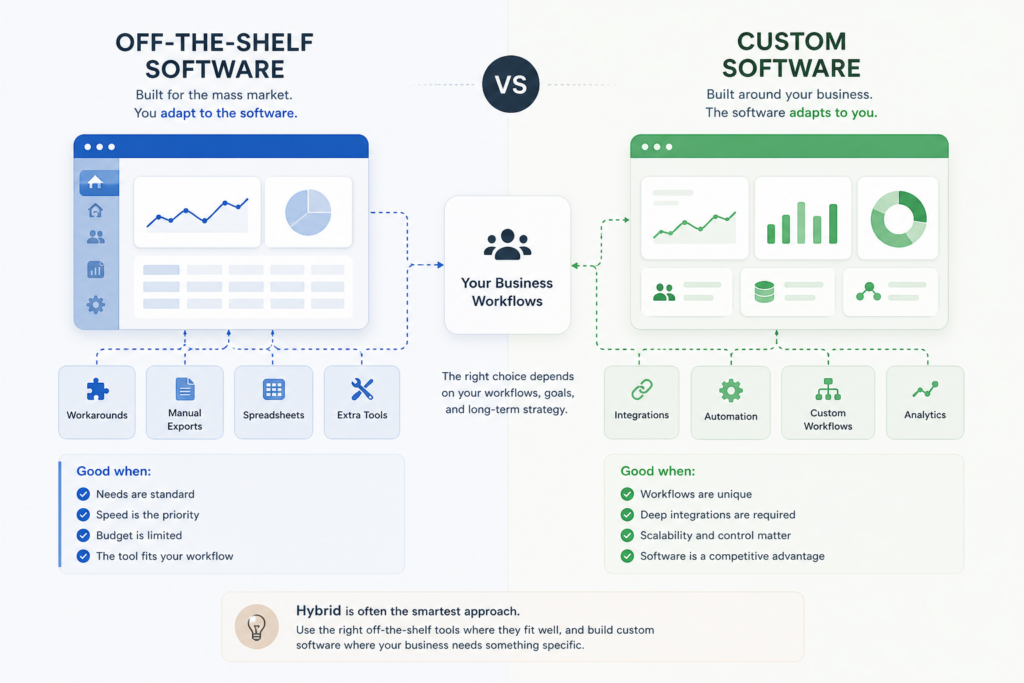
Off-the-shelf software gives you an existing structure. Custom software gives you a system designed around your structure.
With off-the-shelf software, the business usually adapts to the tool.
With custom software, the tool is designed around the business.
That does not automatically make one better than the other. It depends on what you need the software to do.
When off-the-shelf software is the better choice
Off-the-shelf software is often the right choice when the business problem is common and the existing tools already solve it well.
If your team needs standard project management, basic CRM, email marketing, accounting, customer support, document storage, or internal communication, buying an existing tool can be the most practical option.
There is no reason to build custom software for every process.
Off-the-shelf software is usually better when speed matters most
If you need to start quickly, an existing product can help your team move faster.
The product already has user accounts, permissions, interface design, hosting, security work, documentation, support, and a release process. You can often begin using it within days or weeks.
Custom software takes longer because it needs to be designed, estimated, built, tested, deployed, and improved over time.
If the workflow is simple and the market already has strong tools, off-the-shelf software may be the better first step.
Off-the-shelf software can reduce early cost
A subscription product is usually cheaper at the beginning than building custom software.
Instead of investing in product design, architecture, development, testing, infrastructure, and maintenance, you pay a recurring fee for a product that already exists.
This can be useful when:
- the business is still validating a process
- the workflow is not unique
- the team is small
- the budget is limited
- the software is not a core competitive advantage
However, lower initial cost does not always mean lower long-term cost. Subscription fees, user limits, paid add-ons, workarounds, integration tools, consultants, and operational friction can add up over time.
Off-the-shelf software is useful for standard processes
Some business processes are common enough that mature software already handles them well.
Examples include:
- basic accounting
- email marketing
- simple sales pipelines
- help desk ticketing
- team communication
- file sharing
- basic analytics
- standard project tracking
If your process fits the tool, buying makes sense.
The problem starts when the tool almost fits — but not quite.
When off-the-shelf software becomes a limitation
Off-the-shelf software becomes limiting when the business starts bending itself around the tool instead of the tool supporting the business.
This usually happens gradually.
At first, the tool works well enough. Then the team adds spreadsheets, manual exports, extra tools, custom fields, third-party connectors, internal workarounds, and repeated manual steps.
Eventually, the software stack becomes fragmented.
Common signs that off-the-shelf software is no longer enough
You may be outgrowing off-the-shelf software if:
- your team uses several disconnected tools for one workflow
- important data is spread across multiple platforms
- employees rely on spreadsheets to fill gaps
- manual work is required between systems
- reporting is slow or unreliable
- customers experience delays because internal tools do not connect
- you cannot model your real business rules inside the software
- integrations are fragile or incomplete
- subscription costs keep growing without solving the core problem
- the tool limits your product or service strategy
At that point, the issue is no longer just software preference.
It becomes an operational problem.
When custom software makes more sense
Custom software becomes the better option when the software needs to support something specific, strategic, or difficult to fit into a generic product.
This is especially true when the system is tied directly to how the business creates value.
Custom software is stronger for unique workflows
If your business has workflows that do not fit standard tools, custom software may be necessary.
That does not mean every small difference requires custom development. But when the workflow itself is central to your business, forcing it into a generic product can create long-term problems.
Examples include:
- industry-specific operational processes
- custom approval flows
- specialized customer journeys
- complex data collection
- multi-step internal workflows
- role-based product logic
- workflow automation across departments
Custom software allows the system to follow the business process instead of forcing the process into a tool designed for someone else.
Custom software is stronger for integrations
Many businesses do not need one isolated tool. They need a system that connects several tools, services, APIs, data sources, and user roles.
This is where custom software often becomes valuable.
A custom platform can connect:
- external APIs
- CRM systems
- payment providers
- accounting tools
- IoT devices
- mobile applications
- internal databases
- analytics systems
- AI services
- legacy platforms
Off-the-shelf software may offer integrations, but they are usually designed around common use cases. If your integration logic is specific, custom development may be the only reliable way to make the workflow work properly.
Custom software is stronger for ownership and control
With off-the-shelf software, you depend on the vendor’s roadmap, pricing, limitations, API access, support, product decisions, and platform rules.
That is acceptable for many tools.
But if the software is central to your operations or product, dependency can become a risk.
Custom software gives you more control over:
- features
- data structure
- integrations
- infrastructure
- security requirements
- user roles
- business logic
- reporting
- long-term product direction
This control matters when software becomes part of the company’s actual operating model.
Custom software is stronger for competitive differentiation
If every competitor can buy the same tool, the tool itself is not a competitive advantage.
That does not mean off-the-shelf tools are bad. It means they are usually not enough when the product, service, or operational model depends on doing something differently.
Custom software can support a business model that is difficult for others to copy because the system is designed around your process, your data, and your way of serving customers.
Cost comparison: custom software vs off-the-shelf software
The cost comparison is not as simple as “custom software is expensive and off-the-shelf software is cheap.”
Off-the-shelf software usually has a lower starting cost. Custom software usually has a higher starting cost.
But long-term cost depends on usage, scale, customization, workarounds, integrations, and whether the software actually solves the problem.
Off-the-shelf software costs
Off-the-shelf costs may include:
- monthly or annual subscription fees
- per-user pricing
- paid add-ons
- implementation support
- training
- consultants
- integration tools
- data migration
- workflow workarounds
- higher tiers required for advanced features
The product may still be cheaper than building custom software, especially for standard needs.
But if the team spends too much time working around the tool, the hidden cost can become significant.
Custom software costs
Custom software costs may include:
- scope analysis
- product design
- software architecture
- frontend development
- backend development
- database design
- integrations
- cloud infrastructure
- testing
- project management
- deployment
- ongoing maintenance
This is a larger initial investment, but it can make sense when the system supports core operations, revenue, customers, or long-term product growth.
We covered cost planning in more detail in our guide on how much it costs to build an MVP.
Quick comparison table
| Question | Off-the-shelf software | Custom software |
|---|---|---|
| Fastest to start? | Usually yes | Usually no |
| Lowest initial cost? | Usually yes | Usually no |
| Best for standard workflows? | Usually yes | Sometimes unnecessary |
| Best for unique workflows? | Often limited | Usually stronger |
| Best for deep integrations? | Depends on available connectors | Usually stronger |
| Full ownership and control? | No | Yes |
| Vendor dependency? | Higher | Lower, if built properly |
| Long-term scalability? | Depends on product limits | Can be designed around growth |
| Competitive differentiation? | Limited | Stronger |
Real example: when custom software makes sense
A good example is an operational platform like Aiota.
Aiota is not just a simple dashboard or a standard internal tool. It is an operational data platform designed to unify data from IoT sources, external systems, business workflows, and real-world operational inputs.
This kind of system is difficult to solve cleanly with one off-the-shelf product.
The problem is not only displaying data. The platform needs to collect information from different sources, structure it, connect it to business workflows, support multiple use cases, and continue expanding as new integrations and operational needs appear.
In that situation, custom software is not a luxury.
It becomes the practical way to build a system that matches the business reality.
Another example: industry-specific platforms
Custom software also becomes important when a product is built around an industry-specific workflow that generic tools cannot cover properly.
For example, in an ongoing music industry platform project, the goal is to help artists manage a much broader process: music upload, music video upload, release management, royalty tracking, payments, communication, and fan engagement.
That is not just a website or a simple admin panel.
It is a custom operating system for a specific business model.
Many separate tools may solve small parts of that workflow, but the value comes from connecting the process into one structured platform. That is where custom software can create a stronger long-term foundation.
Custom software for SaaS and revenue-generating platforms
Custom software is also often the right choice when the software itself is the product.
If a company is building a SaaS platform, marketplace, CRM, mobile product, data platform, or subscription business, off-the-shelf tools may support some parts of the operation — but the core product usually needs to be custom.
For example, AnthemCRM is a revenue-generating CRM platform built for customer relationship management, marketing automation, analytics, AI-enabled features, and long-term product growth.
A product like that needs custom architecture because the software is not only supporting the business.
The software is the business.
Custom software for takeover, refactoring, and long-term ownership
There is another situation where custom software matters: when an existing product already exists, but the company needs to improve it, stabilize it, or take control of its technical direction.
This is not a simple build-vs-buy decision.
It is a question of long-term ownership.
For example, gowithYamo was already a live mobile product when mile.dev took over development. The work involved improving native mobile applications, backend services, data structures, infrastructure, testing workflows, and release management.
In this kind of project, the value is not just in adding features. The value is in making the platform easier to maintain, improve, and scale over time.
Questions to ask before choosing custom software or off-the-shelf
Before choosing between custom software and off-the-shelf software, it helps to ask practical questions.
Is the workflow standard or specific?
If the workflow is standard, off-the-shelf software may be enough.
If the workflow is specific to your business model, industry, operations, or customer experience, custom software may be a better fit.
Is the software supporting the business or defining the business?
If the software only supports a common internal process, buying may be better.
If the software defines how the business delivers value, custom development becomes more important.
How important are integrations?
If the software needs to connect multiple systems, data sources, APIs, users, roles, and workflows, custom software may provide a cleaner solution.
If basic integrations are enough, off-the-shelf tools may work well.
How much control do you need?
If you are comfortable with the vendor’s roadmap, pricing, and platform limits, off-the-shelf software may be fine.
If you need control over the roadmap, data structure, infrastructure, user experience, and business logic, custom software may be worth the investment.
Will the system need to evolve significantly?
If the process is stable and unlikely to change much, off-the-shelf software can be a strong choice.
If the system will evolve with your product, customers, operations, integrations, and data needs, custom software may be more sustainable.
A hybrid approach is often the right answer
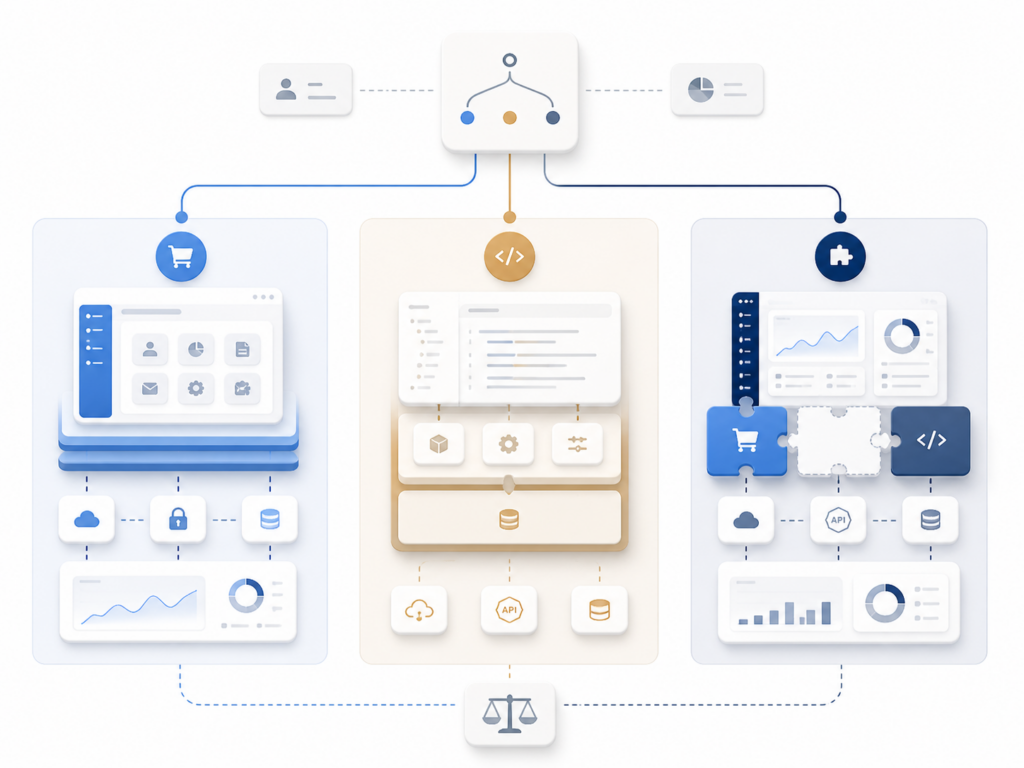
Many strong software systems use both custom development and off-the-shelf tools.
The goal is not to build everything from scratch.
The goal is to build what makes the business specific, while using existing tools where they make sense.
For example, a custom platform may still use:
- Stripe for payments
- Twilio for SMS
- Google APIs for maps or authentication
- OpenAI for AI-enabled features
- AWS or Azure for infrastructure
- third-party analytics tools
- external CRM or marketing tools
This is often the most practical approach.
Custom software does not mean rebuilding every commodity service. It means designing the core system around the business while integrating reliable external services where appropriate.
How mile.dev approaches this decision
At mile.dev, we do not believe every problem requires custom software.
Sometimes the right recommendation is to use an existing tool, validate the workflow, reduce risk, and avoid unnecessary development cost.
But when the business needs a system built around specific workflows, complex integrations, long-term ownership, scalability, or product differentiation, custom development becomes the stronger option.
Our work focuses on custom software development, web platforms, SaaS products, mobile applications, backend systems, AI-enabled features, data platforms, integrations, infrastructure, and modernization of existing systems.
The important part is not only writing code.
The important part is understanding what should be built, what should not be built, and how the system should be structured so it can evolve over time.
Custom software vs off-the-shelf software: which should you choose?
Choose off-the-shelf software when the problem is common, the workflow is standard, speed matters most, and existing tools solve the need well enough.
Choose custom software when the workflow is specific, the system connects multiple moving parts, the software supports a core business model, or long-term ownership and scalability matter.
In many cases, the best solution is hybrid: use existing tools where they are strong, and build custom software where your business needs something specific.
The right decision depends on your process, users, budget, integrations, data, and long-term goals.
If you are deciding between custom software and off-the-shelf tools, you can start with a free consultation. Send us your project details and we will help you think through whether custom development makes sense, where existing tools may be enough, and what the realistic next step should be.